Download XLSX Viewer - XLS Editor free on android
APK file Sheet Editor 1.0.68How to install APK / APKS / OBB file on Android
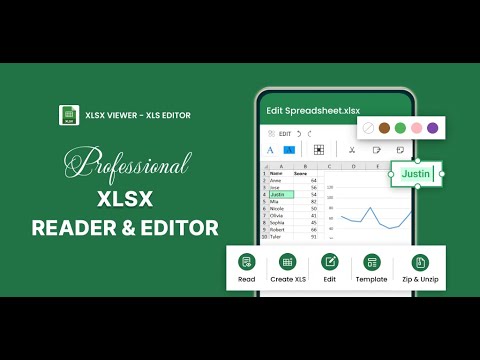

👑Ideal XLSX viewer app - see the data analysis document sheet on your phone without PC or laptop👑
📗The Xlsx Viewer - Xls editor application helps you:
🔔View stock and cryptocurrency data professionally in sheet files
🔔Edit xls files anytime anywhere: add text or image in cell, add formula as sum, average, if…, add & edit text in xlsx document with many fonts as a pro word editor
🔔 Create xlsx files with useful templates (have all titles and formulas you need)
🔔 Create folders or categories to manage all documents
🔔Analyze investment metrics with Xlsx reader easily
🔔Open Xls files, xlsx documents from others app in one click
🔔 Zip and unzip files to easy sharing
🔔View, collaborate and work with xlsx file viewer anywhere.
🔔Convert Xls to PDF offline without losing quality
🔔View all Xlsx files easily that are stored on the internal memory of SD cards (External Storage) easily
🔔Manage your chart, data analyzes and more while you are viewing your workbooks with xlsx viewer
📗What benefits do you get from the Xlsx Reader application?
✨Convenient and easy to use spreadsheet anywhere, anytime
✨Create xlsx files or folder easily
✨Edit xlsx with many smart tools: add formula to cell in ecel, align text, insert photo in cell...
✨Zip and unzip XLSX files anytime anywhere
✨Friendly interface, easy to use xls editor, absolutely no cost with Xlsx viewer app
✨Light X application, can be used in all devices
✨Share xlsx files to colleagues and friends quickly and easily
✨View spreadsheet documents efficiently and save time searching
✨High-quality read xlsx of office productivity tool
✨Own a full set of useful features: delete, rename, manage, sc . xls files
📗The Xlsx reader application is trusted by many ages and generations
🔽Large, clear font size in spreadsheet interface
🔽Useful features: read, edit, zip, unzip xlsx files
🔽Can adjust both vertical and horizontal view xls files
🔽There are specific instructions for all xlsx features
🔽Share quickly your documents to other apps
🔽Open any file xlsx from gmail, message or other app
🔽Xls to pdf in secs - must try feature
📗Outstanding numbers about the XLSX reader application:
👉5+ built-in tools spreadsheet in xlsx reader app
👉10+ features to edit xlsx anytime anywhere
👉0 cost to pay anything
👉1k+ trusted users in your country
👉Only 30 MB for smart xlsx file viewer app
👉New version of office XLSX reader & editor application
Xlsx File Reader with Xls Viewer can be your default xls reader and directly open the xls file from the file manager, email container or web in this xls viewer without opening the application. If you already have any Xls files on your device, use this file opener and start working immediately. Download xls viewer app today and start collaborating your work with xls viewer & editor app!
- Disclaimer
All product names, logos, brands, trademarks and registered trademarks, which are not owned by us, are property of their respective owners.
All company, product and service names used in this app are for identification purposes only. Use of these names, trademarks and brands does not imply endorsement.
Xlsx Viewer - Xls Editor app is owned by us and is not an official Microsoft Corporation application. We are not affiliated, associated, authorized, endorsed by, or in any way officially connected with Microsoft Corporation.
- LicenseFree
- File nameSheet Editor
- File Version1.0.68
- Package namecom.xlsxviewerapp.xlsxreader.xlsxeditor.editexel.exel.xlsx.xls.spreadsheeteditor
- Size104.13 MB
- UploadedOctober 3, 2026
- Android7.0 or later

- CategoryProductivity
- DeveloperMetaMobile
- Developer sitehttps://metamoblie.com/
- Developer emailcraflo.mdy@gmail.com
- md5 hash289f4b366bab7f592dfb2e8456eae2ba
- Architecture-
- Permissionsshow (17)
